Amazon has just unleashed two new Android tablets to add to its Kindle Fire HD line, so it’s kind of expected that all eyes would be on the new Kindle Fire HDX devices. But if the high specs and relatively higher prices aren’t your kind of thing, then maybe Amazon’s second take on the Kindle Fire HD might make you feel less left out.
The Kindle Fire HD, itself an evolution of the original Kindle Fire, is already a year old. Everyone has been expecting Amazon to bring out new tablets, which it did today, but it seems that the retailer giant has other plans for the old 7-inch device. Instead of completely replacing it with the new Kindle Fire HDX 7, Amazon has decided to instead repackage the original Kindle Fire HD with a new look, both inside and outside.
Wednesday, September 25, 2013
Monday, September 23, 2013
T-Mobile Moto X getting software update to improve camera quality
The Moto X is an excellent phone, but if there is was anything holding it back, it’s the camera quality. The perception from myself and many other reviewers is that it’s a software issue, and it looks like we were right. An update is now ready to roll and T-Mobile’s Moto X is going to be the first to get it. The changelog is as follows:
Friday, August 16, 2013
Designing a custom Moto X with a 4-year old using Motomaker
Most of the tech bloggers were given an opportunity yesterday to customize a Moto X using a Beta version of Motomaker. We already did a thorough hands on at the Motorola event a couple of weeks ago so I didn’t take this opportunity to give you another boring hands on. I decided to bring my 4-year old son along for the ride and let him customize it the way he wanted. This video isn’t going to be as professional as my other videos, but it is an example of someone diving right in without playing with it for an hour before turning on the camera. We just opened the site, went through our selections, and order it. We didn’t get into the engravings or the wallpapers, but you can see more about that stuff in our previous hands on.
Motorola Skip for Moto X formally announced, includes three Skip Dots and is free with custom Moto X purchases
Last night, a new accessory for the Moto X called Motorola Skip showed up and vanished just as quickly. We already had an idea that it was designed to clip to your pants to unlock your Moto X easier, at least for those that use a security PIN or pattern lock. This is the case, but Motorola just formally introduced it and gave us a little more information.
If you remember, back in May at D11, Regina Dugan showed off some futuristic ways people will be able to use to authenticate their devices. The Motorola Skip isn’t that futuristic, but it is an example of some of the early progress that Motorola is making. Even though it is something that every smartphone/tablet owner should do, often times people don’t set a security lock screen since it’s such a pain to unlock the device just to read a quick email. Motorola Skip was designed to allow Moto X owners to implement this security, but still be able to unlock their device with ease.
Wednesday, August 14, 2013
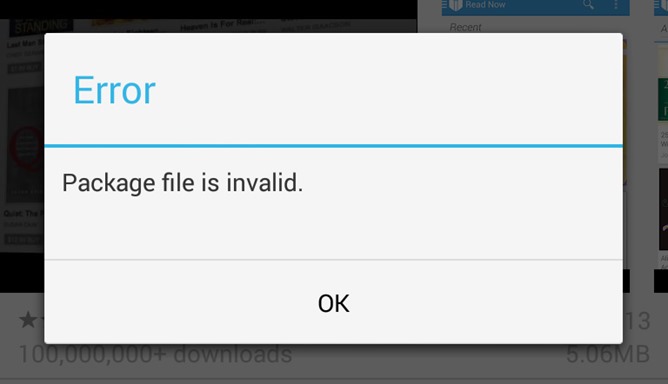
Play Store Team Acknowledges Pervasive Package File Invalid Error When Installing Or Updating Apps, No Fix Yet
Update: The issue (#10230007) has been marked as resolved by the Play Store team. Apps should install and update fine now.
For the last week or so, a great number of Android users have become increasingly frustrated with frequent "Package file is invalid" errors when updating or installing apps. A variety of supposed fixes have been put forward by the community, but have proven to be merely placebos. Now Google has confirmed there is an issue. So no, it's not just you.
[New Game] Double Fine's Middle Manager Of Justice Hits Google Play, Saves The World One TPS Report At A Time
Superheroes are good at fighting evil directly and getting the girl, but have you ever thought about the valuable and experienced support staff behind the hero? Of course you haven't, because a good middle manager is invisible – like a ghost loaded down with busy work. In Double Fine's Middle Manager of Justice, you can build and manage a team of superheroes to save the world in a roundabout way.
The game invites you to hire heroes and keep them busy around the office to increase their skills. When the time comes to do battle with the forces of evil, you direct the action. Your base of operations (read: the office) can be customized to make your team the best it can be.
Middle Manager of Justice features cool animated art visuals and a wacky sense of humor. It's optimized for Tegra devices (and includes some extra content), but should run on any Android device. It is free to download, but there are in-app purchases.
VLC for Android
The game invites you to hire heroes and keep them busy around the office to increase their skills. When the time comes to do battle with the forces of evil, you direct the action. Your base of operations (read: the office) can be customized to make your team the best it can be.
Middle Manager of Justice features cool animated art visuals and a wacky sense of humor. It's optimized for Tegra devices (and includes some extra content), but should run on any Android device. It is free to download, but there are in-app purchases.
VLC for Android
Saturday, July 13, 2013
How to use VPN on Android
VPN services
You can also subscribe to VPN services that will allow you to browse securely and/or anonymously through public Wi-Fi hotspots from your phone for a monthly fee. You can even get an IP address that’s out of a different country, so that you can access online TV services and other services that are restricted to users from that particular area.
Built-in Android VPN client
Android phones generally include a built-in VPN client, which you’ll find in the Settings | Wireless & networks menu. It’s labeled VPN settings: Set up and manage Virtual Private Networks (VPNs), as shown in Figure 1. The phone used for the screenshots is an HTC Thunderbolt running Android 2.2.1 (Froyo). However, Android has included VPN support since version 1.6 (Donut).
Subscribe to:
Posts (Atom)