Friday, August 16, 2013

Designing a custom Moto X with a 4-year old using Motomaker


Most of the tech bloggers were given an opportunity yesterday to customize a Moto X using a Beta version of Motomaker. We already did a thorough hands on at the Motorola event a couple of weeks ago so I didn’t take this opportunity to give you another boring hands on. I decided to bring my 4-year old son along for the ride and let him customize it the way he wanted. This video isn’t going to be as professional as my other videos, but it is an example of someone diving right in without playing with it for an hour before turning on the camera. We just opened the site, went through our selections, and order it. We didn’t get into the engravings or the wallpapers, but you can see more about that stuff in our previous hands on.

Motorola Skip for Moto X formally announced, includes three Skip Dots and is free with custom Moto X purchases


Last night, a new accessory for the Moto X called Motorola Skip showed up and vanished just as quickly. We already had an idea that it was designed to clip to your pants to unlock your Moto X easier, at least for those that use a security PIN or pattern lock. This is the case, but Motorola just formally introduced it and gave us a little more information.

If you remember, back in May at D11, Regina Dugan showed off some futuristic ways people will be able to use to authenticate their devices. The Motorola Skip isn’t that futuristic, but it is an example of some of the early progress that Motorola is making. Even though it is something that every smartphone/tablet owner should do, often times people don’t set a security lock screen since it’s such a pain to unlock the device just to read a quick email. Motorola Skip was designed to allow Moto X owners to implement this security, but still be able to unlock their device with ease.

Wednesday, August 14, 2013

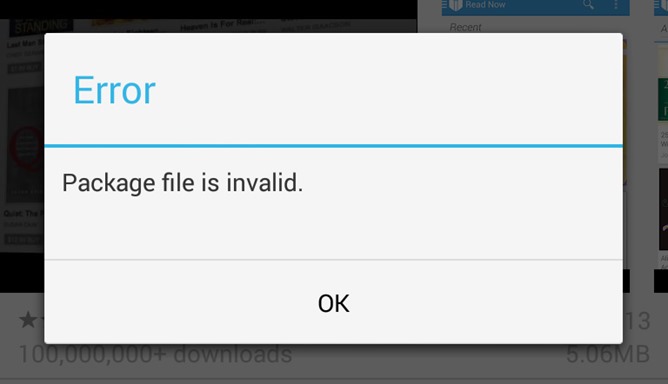
Play Store Team Acknowledges Pervasive Package File Invalid Error When Installing Or Updating Apps, No Fix Yet

Update: The issue (#10230007) has been marked as resolved by the Play Store team. Apps should install and update fine now.

For the last week or so, a great number of Android users have become increasingly frustrated with frequent "Package file is invalid" errors when updating or installing apps. A variety of supposed fixes have been put forward by the community, but have proven to be merely placebos. Now Google has confirmed there is an issue. So no, it's not just you.

[New Game] Double Fine's Middle Manager Of Justice Hits Google Play, Saves The World One TPS Report At A Time

Superheroes are good at fighting evil directly and getting the girl, but have you ever thought about the valuable and experienced support staff behind the hero? Of course you haven't, because a good middle manager is invisible – like a ghost loaded down with busy work. In Double Fine's Middle Manager of Justice, you can build and manage a team of superheroes to save the world in a roundabout way.

The game invites you to hire heroes and keep them busy around the office to increase their skills. When the time comes to do battle with the forces of evil, you direct the action. Your base of operations (read: the office) can be customized to make your team the best it can be.

Middle Manager of Justice features cool animated art visuals and a wacky sense of humor. It's optimized for Tegra devices (and includes some extra content), but should run on any Android device. It is free to download, but there are in-app purchases.

VLC for Android

Saturday, July 13, 2013

How to use VPN on Android

VPN services


You can also subscribe to VPN services that will allow you to browse securely and/or anonymously through public Wi-Fi hotspots from your phone for a monthly fee. You can even get an IP address that’s out of a different country, so that you can access online TV services and other services that are restricted to users from that particular area. 

Built-in Android VPN client

Android phones generally include a built-in VPN client, which you’ll find in the Settings | Wireless & networks menu. It’s labeled VPN settings: Set up and manage Virtual Private Networks (VPNs), as shown in Figure 1. The phone used for the screenshots is an HTC Thunderbolt running Android 2.2.1 (Froyo). However, Android has included VPN support since version 1.6 (Donut).

Thursday, July 11, 2013

VLC for Android APK download

The VLC media player or popularly known as the VLC is a portable application made by VideoLAN – the project that develops software for playing video and other media formats across a LAN (local area network) as well as DVD, audio CD, VCD and other streaming protocols. VLC is a free and open source cross-platform multimedia player with different versions for different operating systems like Windows, Mac OS X, GNU/Linux and others.

VLC supports a wide range of formats. It is a good hotkey support and easy to use. It is very flexible and lightweight. It integrates with web channel streaming services. VLC player is ranked to be the best among hundreds of media players available in the market out there.

Before, VLC stood for VideoLAN Client not until VideoLAN developed a more improved VLC. Now, VLC is not just simply a client. VideoLAN always make innovations to improve VLC through developing another version.


VLC Features


As VLC was improved to another version, advanced features are also added to this multimedia player application. VLC can support almost all sorts of formats but it will also depend on what OS you are using.

The advanced VLC version can’t just only do control, manage and customize media files regardless of the format but can also have the empowerment of a massive amount of playback, recording, and streaming options.

VLC allows you to play damaged, incomplete, and/or broken content. You can install it through a CD or flash disk unlike other programs. You can also personalize your VLC skin. You can choose from a long range of languages installed in the system and set the streaming capacities of the multimedia player. There are available skin editors and interface that you may need. You can use VLC as an online video downloader for YouTube and many others. It can also rip DVDs. It provides you a basic DVD ripper that can help you rip a movie for you. You can listen to online radio through VLC’s hundreds of radio stations. Just enable the feature and open the playlist to browse for your favorite radio stations. Another feat, you can convert audio and video files from a certain format to another.

For playback features, readable formats include: Input (HTTP, MMS, DVDs, VCD, SVCD, audio CD, RSS feeds, and other files stored on the user’s computer), Container format (3GP, ASF, AVI, FLV, Musical Instrument Digital Interface, QuickTime, MP4, WAV, MPEG-2, AIFF, raw DV, VOB), video formats (DV, MPEG-4 AVC, MJPEG, MPEG-4, RealVideo, and some WMV), subtitles (MPEG-4 Timed Text, Text file), audio formats (AAC, MP3, WMA), audio/video filters (deinterlace, cropping, image adjust, logo overlay, magnification, image distortion, visualization, equalizer), audio/video outputs (Native), interfaces (skins, web, command line, mouse gestures), and other miscellaneous (localization, CPU acceleration).

For streaming features, these includes: inputs, output, miscellaneous, interfaces and more; output method muxer, audio and video format muxer; and possible output formats for the transcoding module.

Furthermore, as Blu-Ray discs are in the limelight, VLC can now also plays files without any troubles but it depends upon your computer’s capacity to handle the format as well as the size of the file. The player handles different device formats and the optimization built in the program allows you to have the best quality of sound, speed, and images. No need for codec anymore, you can play your entire album through VLC media player.

In conclusion, VLC media player is a professional grade multimedia player with all the possible features users might be searching for – all for free.

Tuesday, July 9, 2013

Cheap Android Phones


The line between feature phones and smartphones continues to blur further as the new and promising smart feature phones make their way to the market. Priced attractively at a sub Rs 5,000 range, these devices carry strong specs, giving tough competition to some of the even mid-budget smartphones.
1. Micromax Smarty A65
Micromax's first Android smartphone to feature Spreadtrum’s chipset, Smarty A65 flaunts a impressive 4.3-inch WVGA display, which is not seen too often specially in this low-priced market segment and a Android Gingerbread 2.3.5 OS. Add to that a 1GHz single-core Cortex A5 processor, 2-megapixel camera with flash, Wi-Fi support, 512MB RAM and dual SIM capability and we truly have a winner. Measuring 69.7x130x10.95 mm in dimensions, the device is backed by a 1,350mAh battery which promises 5 hours of talktime along with 200 hours of standby time.
2. Fly F40
This entry-level F40 phone runs on Android 2.3 Gingerbread and sports a 4-inch HVGA display with 320×480 pixels resolution. Powered by a 1GHz dual-core processor, this Dual-SIM phone also comes equipped with a 3.2-megapixel rear along with a VGA front camera. With170MB internal memory and a microSD card slot support for expansion, the device provides a descent 1,400mAH battery backup for all your multimedia needs.
Price: Rs 4,500
3. Intex Aqua Marvel+
Intex is another manufacturer who is gaining grounds with consumers. The company has launched a interesting choice for the budget conscious Android consumer with the Dual-SIM Aqua Marvel+. The device comes fitted with a 3.5-inch HVGA with a 320×480 pixels resolution and is fueled by a 1GHz MTK6515 processor and Android 2.3.6 Gingerbread coupled with a 256MB of RAM. It also comes with a basic 3-megapixel rear camera and a 1,400mAH battery life. On the storage front, there is a 95MB of internal storage with a microSD card support for further expansion. Available in grey, white and yellow color choices, the device also houses connectivity options like Bluetooth, Wi-Fi and USB ports.
Price: Rs 3,990